Hosted StreamDiffusion for TouchDesigner
StreamDiffusionTD × Daydream
Dotsimulate’s StreamDiffusionTD plugin allows TouchDesigner creators to craft amazing real-time visuals with the power of StreamDiffusion. Experience a hosted version of StreamDiffusionTD powered by the Daydream API. No GPU required.
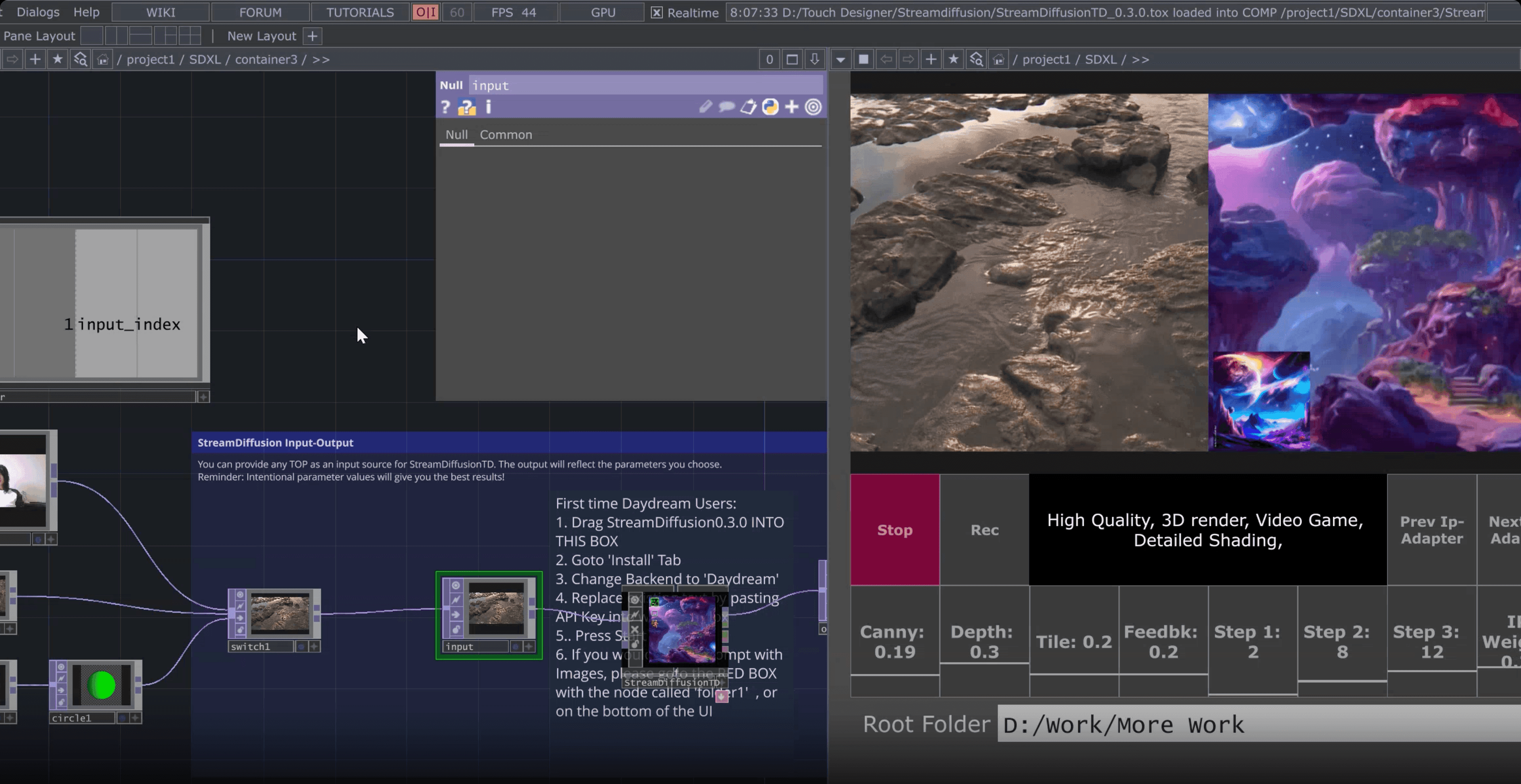
What is hosted StreamDiffusion?
StreamDiffusion is an open source pipeline for real time image diffusion. Running it locally inside TouchDesigner with the StreamDiffusionTD plugin has always meant a Windows PC, an NVIDIA RTX class GPU, Python 3.10, and a CUDA install. That is a lot of friction before you generate a single frame.
Hosted StreamDiffusion moves that inference to the Daydream API. The same StreamDiffusionTD plugin runs against a remote GPU, so you keep real time control of prompt, seed, ControlNet and IP Adapter values from TouchDesigner without the local setup. It works on macOS, it works on laptops without a discrete GPU, and it gets you from zero to first frame in under a minute.
Local setup
Running locally
- Windows PC only
- NVIDIA RTX GPU (6 GB VRAM minimum, 24 GB recommended)
- Python 3.10 or 3.11
- CUDA toolchain + NDI SDK
On the Daydream API
Hosted on Daydream
- Works on macOS and Windows
- Runs on laptops without a discrete GPU
- Free Daydream API key from the Builder Dashboard
- First frame in under a minute
Explore the Daydream ecosystem


Oil painting animation
@as.ws__
SDXL Reaction Diffusion Graffiti
@daydream
Audio-reactive animations
@oceanradiostation
Panda to Bird in the Park
@yondonfu
Magic Library
@ericxtang
Oil painting animation
@as.ws__
SDXL Reaction Diffusion Graffiti
@daydream
Audio-reactive animations
@oceanradiostation
Panda to Bird in the Park
@yondonfu
Magic Library
@ericxtang
Create, Share, and Remix
Experience dynamic worlds born from the latest real-time AI video models — and share your own.
Explore community projectsFrequently asked questions
StreamDiffusionTD is a TouchDesigner operator that connects real time inputs like camera feeds, audio, and sensors to StreamDiffusion, turning them into live generative visuals inside TouchDesigner. It was built by Lyell Hintz (known as dotsimulate) and is distributed through Dotsimulate's Patreon.
Hosted StreamDiffusion runs the StreamDiffusion pipeline on a remote GPU instead of your local machine. With the Daydream API, StreamDiffusionTD offloads inference to Daydream's cloud backend, so you get the same real time generation without a local NVIDIA GPU, Python environment, or CUDA install.
Only if you run it locally. The local path needs a CUDA capable NVIDIA GPU on Windows, with 6 GB of VRAM as the floor and 24 GB recommended for the full feature set. Professional quality output has generally meant an RTX 4090. Running StreamDiffusionTD against Daydream's hosted backend removes that requirement. Any machine that can run TouchDesigner and reach the internet will work, including Apple Silicon Macs.
StreamDiffusionTD runs SDXL Turbo as its native model for real time generation. On top of that, the hosted flow supports multi ControlNet, IP Adapter (including FaceID), and TensorRT acceleration, with real time control over prompt, seed, and ControlNet weights while your stream is live.
Yes. The Daydream hosted path supports multi ControlNet and IP Adapter with FaceID out of the box, and every parameter you would normally tune locally stays adjustable in real time through the plugin.
You need three things. First, the StreamDiffusionTD plugin from Dotsimulate's Patreon. Second, a free Daydream API key from the Builder Dashboard. Third, TouchDesigner installed (2023 or newer on Mac, 2025 or newer on Windows for the official Daydream quickstart file). The fastest path is to download Andrew Sun's Daydream SDXL Easy Quickstart File, which wires StreamDiffusionTD to your Daydream API key with a click and drag install. Total setup time is under a minute.
You can start with a free Daydream API key from the Builder Dashboard. Full pricing details, including paid tiers, live at daydream.live/pricing. The StreamDiffusionTD plugin itself is distributed through Dotsimulate's Patreon.
Locally, StreamDiffusionTD needs Windows, Python 3.10 or 3.11, a matching CUDA toolchain, the NDI SDK, and an NVIDIA GPU with enough VRAM for your model choice. Hosted swaps all of that for a single API key. The tradeoffs are straightforward. Local gives you zero network inference and full offline control. Hosted gives you cross platform support (macOS included), no GPU spend, and a one minute first run.
Connect and create with the
Daydream community
Join creatives, builders, and researchers advancing the frontier of real-time AI video.